18 September 2026
The old software is on the laptop. The new one is on the screen.
One photo, two screens, and the whole distance between building a mix and composing a class. A guided tour of the Track Editor: teaching annotations, cadence in RPM, mix points and beatmix.
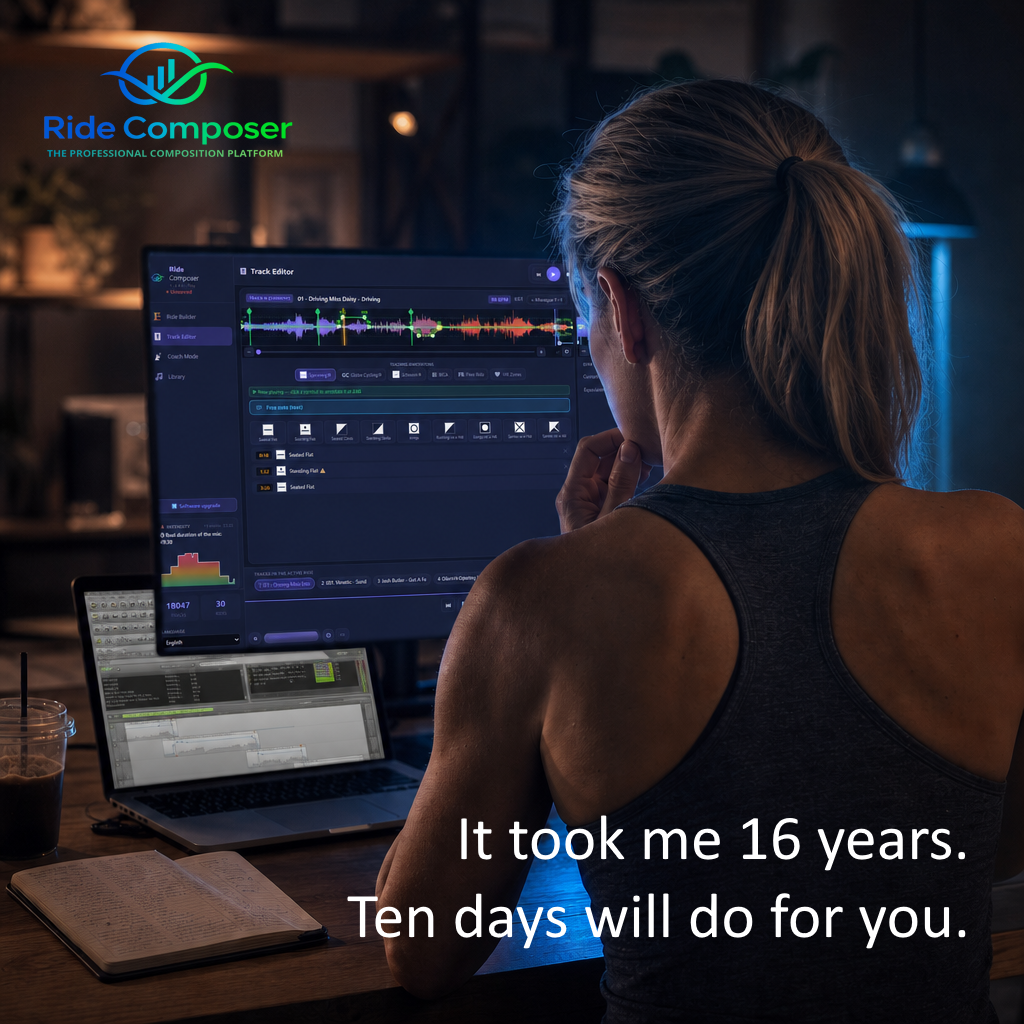
Look closely at this photo. It tells a story many of you are still living.
On the laptop, to the left: DJ mixing software. Grey track lists, a timeline, dull waveforms. It served us well for fifteen years. It no longer receives updates.
On the large screen behind it: the Track Editor. This isn't the same tool grown old — it's a tool asking a different question. The first one asks: "how do I move between these tracks without anyone noticing?" The second asks: "what are you going to make your riders do on this track?"
That is the whole distance between building a mix and composing a class.
Two tracks side by side, nothing left to guess
The Track Editor always shows two tracks facing each other: the one you're working on, and the one that follows. Not one after the other down a long timeline you have to scroll — both, at the same time, in front of you.
Each shows its waveform coloured from blue to red by intensity, and over it, its tempo curve: a green line with control points you drag to speed the track up or slow it down.
That face-to-face is where the coherence of a ride is decided. A climb that ends at full effort followed by a track restarting at 128 BPM isn't a transition, it's a break. You used to notice it by ear, after the fact. Now you see it.
Your annotations, in your own language
Here is the part DJ software will never cover, because it isn't its job.
Below the waveforms sits a row of tabs: Spinning®, Globe Cycling®, Schwinn®, BICA, Free Ride, heart-rate zones. You pick your school, and you get its symbols — not a rough translation, not a lowest common denominator.
For Spinning®, that means the nine official movements: Seated Flat, Standing Flat, Seated Climb, Standing Climb, Jumps, Running on a Hill, Jumps on a Hill, Sprints on a Flat, Sprints on a Hill. You click a symbol while the track plays and it lands on the exact second. It then appears in the list, timestamped: 0:10 Seated Flat, 1:32 Standing Flat, 3:26 Seated Flat.
Need to say something no symbol covers? There's the free note. Because a class isn't only a sequence of positions: it's also "here, remind them to drop their shoulders."
Every school has its theory, and it has its reasons. The software respects it instead of flattening it.
120 BPM is 60 revolutions per minute — and it tells you
A small thing that changes everything, and that sums up the spirit of the tool.
When you correct a track's tempo, the Track Editor doesn't only show you the BPM. Right underneath, it shows the equivalent in RPM: the actual pedalling cadence that tempo imposes on your riders.
120 BPM? 60 revolutions per minute. A heavy cadence, under resistance. That's an instructor's information, not a DJ's — and it's precisely why no mixing software will ever hand it to you.
The ÷2 button sits right beside it, for tracks detected at double or half tempo. One click, Apply, and the cadence recalculates. If you want to know how much that figure matters, we told the story of what one tenth of a BPM does to your climb.
The mix, settled once and for all
The join between two tracks is handled on the same screen. Beatmix lines up the downbeats, and you choose the target tempo — the average of both tracks, over eight beats — rather than being stuck with the first or the second. An EQ swap keeps the two bass lines from piling into mud during the crossover.
The mix point sits on the waveform: visible, draggable. No more tuning it by ear fifteen times over at 11 pm.
And all of it ends up in your hand, on the bike
The Track Editor is only one step. What you build there flows onward by itself.
In the Ride Builder, your class appears in blocks — warm up, ride body, cool down, stretching — each track showing its BPM, cadence, duration and intensity. The intensity graph draws itself, and one glance tells you whether your effort arc holds up or collapses in the middle.
Then, in the studio, Coach Mode takes over. The current symbol appears large with its countdown. The next track and its BPM are announced. The remaining time runs down. You have nothing left to look for: you coach.
And if a rider asks for the track list at the end of class, it exports to PDF in two clicks.
Nine languages, down to the last tooltip
Version 2.0.3 has just closed a quiet but long piece of work: the entire interface now speaks your language. The last tooltips still in English — the annotation list in the Track Editor, the power badge in the Library — have followed.
It isn't the feature that sells a brochure. It's the one that decides whether a tool gets adopted or abandoned after three evenings. We explained why "Seated Flat" doesn't translate, and what that implies.
You don't start from scratch
The question everyone asks, and it's a fair one: "what about the classes I've already built?"
They come across. RideComposer imports your .mmp project files. Your rides arrive with their tracks and their structure. You don't rebuild four years of work to change tools — which is exactly what kept most instructors from moving.
Ten days to make up your own mind
The software runs on Windows. The trial lasts ten days, no card required, and gives you everything.
It took me sixteen years as a certified instructor to have this tool in my hands. Ten days will be enough for you to know whether it's made for you.